IPTV Service: The Complete Technical Architecture & Buyer's Guide (2026)
Traditional television delivery has fundamentally broken down for the modern viewer. Between ballooning legacy cable bills that routinely surpass $150 per month, restrictive regional sports blackouts, and fragmented streaming subscriptions that require managing half a dozen separate apps, cord-cutters have abandoned linear broadcasting in record numbers. In its place, Internet Protocol Television has emerged as the definitive standard for live broadcast entertainment.
1. What Is an IPTV Service and How Does It Deliver Live Television?
At its foundation, an IPTV service delivers live television broadcasts, video on demand (VOD), and time-shifted programming over standard Internet Protocol (IP) networks, rather than using traditional radio frequency formats such as terrestrial antenna signals, coaxial cable lines, or direct-broadcast satellite dishes.
Instead of tuning into a physical radio frequency multiplexer where every channel broadcasts simultaneously into your home regardless of whether your television is turned on, an IPTV service operates as an interactive unicast client-server system. When you change channels on an IPTV application, your playback client sends a lightweight HTTP request to an origin or edge server, requesting a specific transport stream chunk. The server immediately begins transmitting discrete data packets containing the chosen channel's audio and video data directly to your device's memory buffer.
The Video Pipeline: From Satellite Ingestion to CDN Edge Nodes
To understand stream stability, consider the journey a live broadcast takes before appearing on your screen:
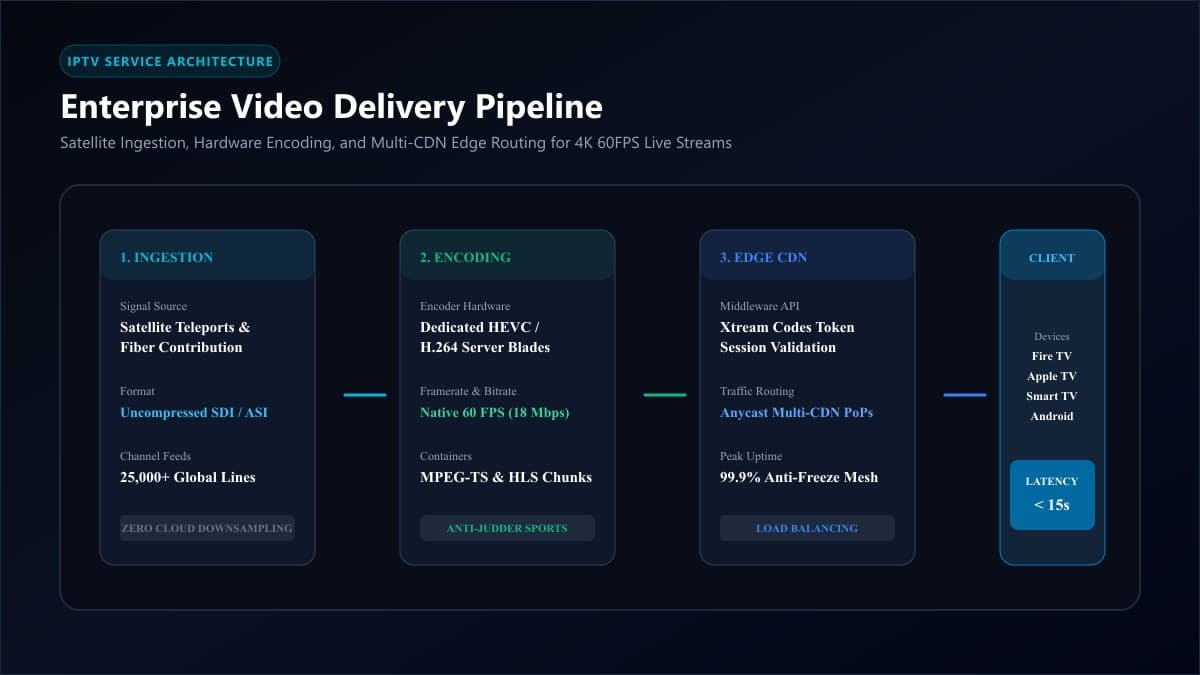
- Ingestion & Downlink: High-grade teleport receiver stations capture uncompressed broadcast signals directly from geostationary satellites and fiber contribution feeds.
- Hardware Encoding: Broadcast ingest servers route the uncompressed SDI or HDMI signals through dedicated hardware encoders (such as enterprise H.264/AVC or H.265/HEVC blades). Here, the raw video is compressed into standardized transport streams (typically MPEG-TS or HLS container formats) at native bitrates and framerates (e.g., 1080p at 60FPS or 4K UHD).
- Middleware & Authentication: The encoded stream enters an IPTV middleware management layer (historically pioneered by the Xtream Codes architecture). This system validates your active account credentials, assigns your stream connection slot, and monitors session concurrency.
- Content Delivery Network (CDN) Edge Routing: A professional IPTV service distributes streams across a globally dispersed cluster of Content Delivery Network (CDN) edge points-of-presence (PoPs). When an end-user connects from Chicago, London, or Toronto, the stream routes from the nearest physical server node, drastically minimizing latency and preventing route bottlenecks.
- Client-Side Decoding: Your streaming hardware (such as an Amazon Fire TV Stick, Apple TV, or Smart TV) receives the incoming data stream, places it into an adjustable playback buffer, decodes the video via hardware acceleration, and renders the feed onto your display.
IPTV vs. Traditional Cable vs. Closed Streaming Apps (OTT)
| Feature Dimension | Traditional Cable / Satellite | Closed OTT Apps (YouTube TV, Fubo) | Modern Premium IPTV Service |
|---|---|---|---|
| Delivery Medium | Coaxial cable or Ku-band satellite | Closed, proprietary cloud CDN | Open-standard IP transport (HLS, MPEG-TS, Xtream Codes) |
| Channel Capacity | Typically 150 – 300 channels | 80 – 120 curated channels | 25,000+ live international channels |
| Hardware Required | Proprietary rented set-top boxes ($15/mo each) | Any app-store streaming device | Universal hardware (Firestick, Apple TV, Smart TVs, Android) |
| Player Freedom | Locked to provider interface | Locked to proprietary vendor app | Choice of elite players (TiviMate, IPTVX, Smarters) |
| Typical Monthly Cost | $120 – $180+ per month | $75 – $105 per month | $10 – $15 per month equivalent |
| Contract Commitments | 12 to 24-month locked contracts | Month-to-month auto-billing | Flexible prepaid plans (3, 6, 12 mo) without auto-renew |
2. Core Delivery Formats: Xtream Codes API vs. Static M3U Playlists
When provisioning a modern IPTV service, providers deliver account access using two primary formats: an Xtream Codes API configuration or an M3U playlist URL. Understanding the architectural differences between these protocols is vital for a seamless user experience.
Why Xtream Codes Has Become the Modern Industry Standard
An M3U playlist is essentially a static plain-text file containing thousands of individual stream URLs preceded by metadata tags. When you import a massive 25,000-channel M3U file into your streaming device, your media player must download, parse, and store text files that can exceed 50 to 100 megabytes in memory. On lower-powered streaming sticks, this creates sluggish interface performance, memory crashes, and excruciatingly slow playlist refreshes.
In contrast, the Xtream Codes API operates over an intelligent client-server architecture using three clean parameters: Server URL, Username, and Password. When you log in via Xtream Codes API on advanced players like TiviMate or IPTV Smarters Pro, the application queries the server dynamically via JSON endpoints. Instead of downloading all 25,000 channels simultaneously, it loads category headers instantly and queries specific channel details, electronic program guide (EPG) schedules, and VOD metadata on demand.
3. What Separates a Premium IPTV Service from Oversold Reseller Panels?
The single greatest source of consumer frustration in the streaming marketplace stems from low-cost reseller panels. Anyone can purchase a wholesale credit package from an oversubscribed data center, rebrand it with a generic template, and market it as a "flagship streaming service" for $5 per month.
Within weeks, thousands of simultaneous viewers overload the unmanaged origin servers during Sunday NFL games or Saturday Premier League matches, resulting in perpetual buffering circles, audio desynchronization, and total server outages.
A professionally engineered platform like nobiptv utilizes dynamic multi-CDN clusters. If a sudden surge of 50,000 concurrent viewers tunes in for a heavyweight pay-per-view boxing broadcast, intelligent routing algorithms distribute the load across unaffected server nodes, maintaining consistent packet transmission without freezes.
Cheap IPTV providers down-convert live sports feeds to 30 frames per second (FPS) to cut their bandwidth and CDN bills in half, producing ball ghosting and motion blur. A legitimate sports IPTV streaming service broadcasts in native 1080p 60FPS and 4K UHD 60FPS for true stadium-grade fluidity.
4. Network and Hardware Requirements for Buffer-Free Playback
A world-class IPTV service cannot compensate for local hardware bottlenecks or improperly configured home networks. Ensuring a flawless viewing experience requires understanding your network requirements and device capabilities.
Bandwidth Benchmarks Per Active Connection
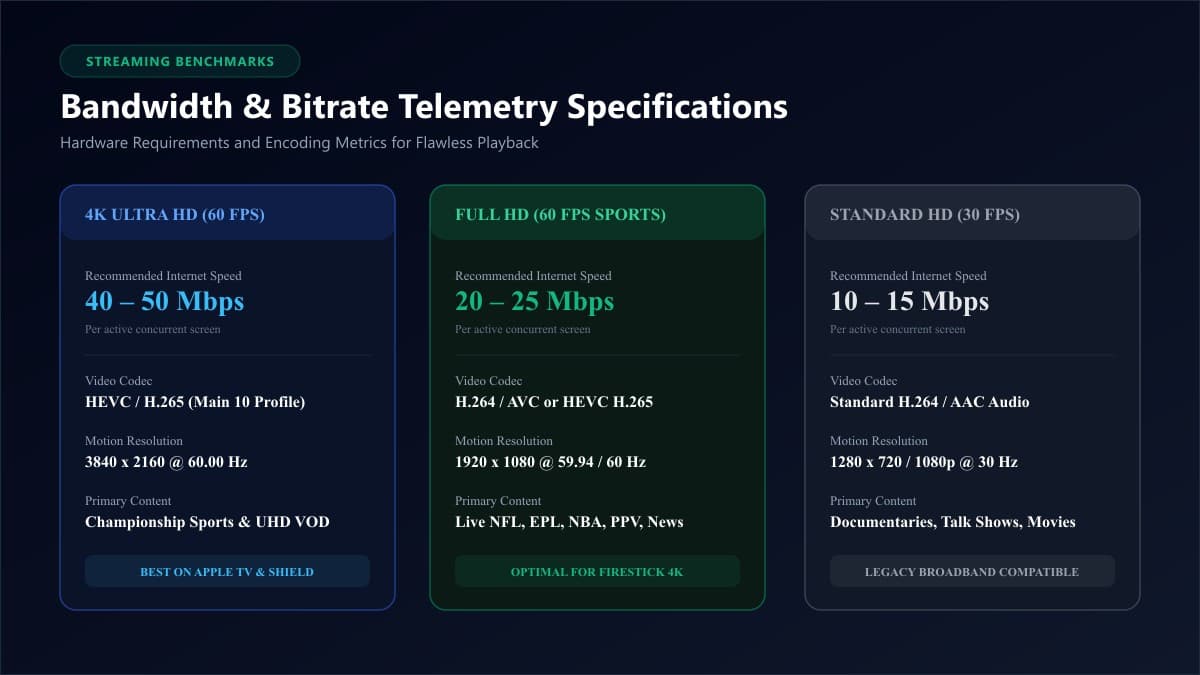
- Standard HD (720p/1080p @ 30FPS): 10 to 15 Mbps download speed per screen.
- Full HD Sports (1080p @ 60FPS): 20 to 25 Mbps download speed per screen.
- Native 4K Ultra HD (HEVC @ 60FPS): 40 to 50 Mbps stable download speed per screen.
Note: Low ping jitter (< 20ms) is essential. For best results on living room displays, connect your streaming device directly via Cat6 Ethernet or high-speed 5GHz Wi-Fi.
5. How to Evaluate and Choose the Right IPTV Service
Selecting an IPTV service should be approached with the same diligence as choosing any primary utility. Use the following structured criteria before committing to a provider:
6. Step-by-Step: How to Configure an IPTV Service on Any Device
Setting up an IPTV service takes less than five minutes when using the Xtream Codes protocol. Follow this universal configuration procedure across streaming sticks and smart TVs:
- Install a Dedicated Player App: On Amazon Fire TV, install TiviMate or Smarters Pro (see our Firestick IPTV setup guide). On Samsung/LG Smart TVs, install store-verified apps like IBO Player (see our Smart TV IPTV setup guide).
- Select Xtream Codes Login: Launch the player, choose "Add Playlist", and select "Xtream Codes API".
- Enter Your Credentials: Input your server URL, username, and password provided upon account activation.
- Adjust Buffer Size: Navigate to your player's playback settings and set the buffer to Medium (3–5 seconds) to absorb transient network jitter and eliminate micro-buffering.
Frequently Asked Questions About IPTV Services
What is the difference between an IPTV service and an IPTV player?
An IPTV service is the content subscription provider that operates the origin servers, broadcast encoders, and live channel playlists. An IPTV player (such as TiviMate, IPTV Smarters, or IBO Player) is simply the software application installed on your streaming hardware that renders the video interface. An IPTV player contains zero media content on its own; it requires an active subscription line to function.
How much internet speed do I actually need for an IPTV service?
For consistent, buffer-free playback, a single 1080p stream at 60FPS requires a reliable 20 to 25 Mbps download speed. If you intend to stream native 4K Ultra HD broadcasts or operate multiple simultaneous connections in different rooms, a home broadband connection of 50 to 100+ Mbps is strongly recommended.
Why do cheap IPTV services buffer during big football games?
Low-cost providers operating $3 to $5 reseller panels typically lease undersized origin servers without multi-CDN edge networks. When thousands of concurrent viewers tune in simultaneously for a major live sporting event, the server's outgoing bandwidth pipeline saturates, resulting in packet drops and continuous buffering circles for all connected subscribers.
Can I use one IPTV service subscription on multiple devices simultaneously?
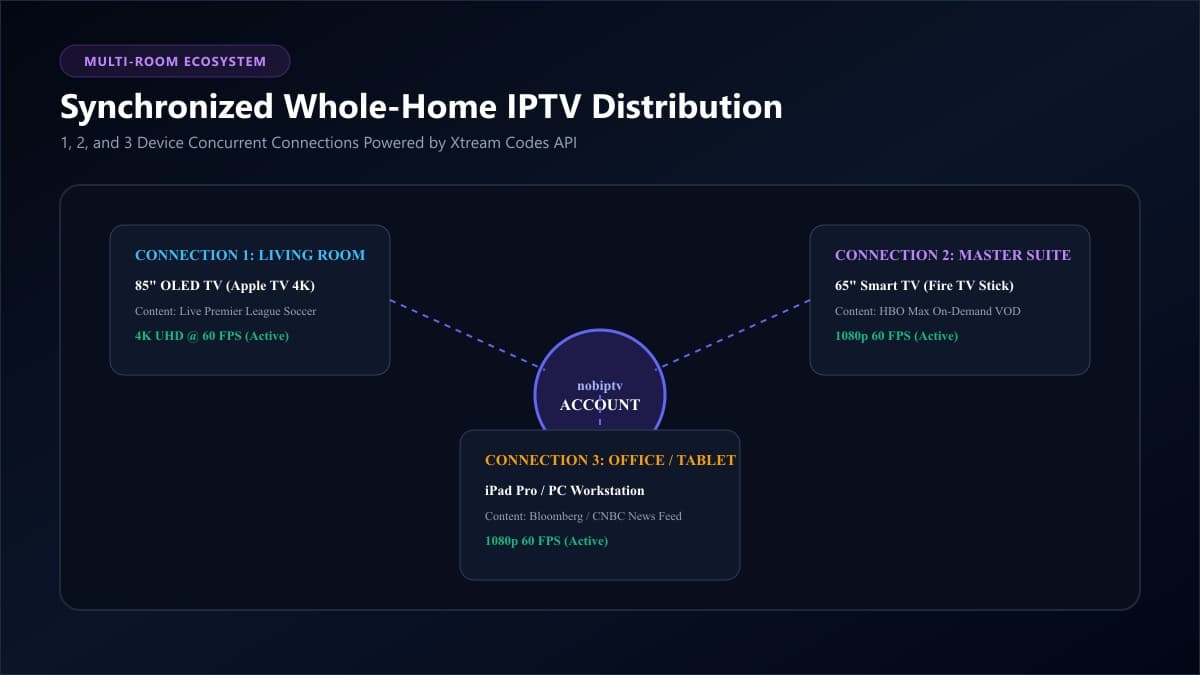
Yes, provided your subscription tier includes multiple concurrent connections. Standard plans typically include 1 connection for a single room. Leading providers like nobiptv offer multi-device tiers (supporting 2 or 3 simultaneous screens) so different family members can watch live sports in the living room and movies in the bedroom simultaneously under a single account.
What is the best app to run an IPTV service on Firestick?
For Amazon Fire TV devices, TiviMate is widely recognized as the industry benchmark media player, offering a fluid electronic program guide, customizable category groups, multi-view screen capabilities, and native hardware video acceleration. IPTV Smarters Pro serves as an excellent free alternative.
Do I need a VPN to use an IPTV service?
While an IPTV service does not technically require a VPN to operate, utilizing one is highly recommended if your Internet Service Provider enforces traffic shaping or deep packet inspection during evening hours. A VPN encrypts your video data packets, preventing your ISP from identifying and throttling your streaming connection during live sports events.
Ready to Experience nobiptv?
Join thousands of satisfied viewers. Get the best IPTV services with our premium IPTV subscriptions, instant activation, and 24/7 dedicated support.