VLC IPTV Not Working? 7 Fixes for Playback Errors
Your IPTV playlist worked, or should have, and now VLC shows an error, a blank screen or a stream that keeps freezing. Most VLC problems come from a handful of causes. This guide helps you match what you see to the likely cause and the fix, starting with the quickest checks.
Short answer
Recopy your full playlist link, confirm your subscription is active, and open Tools > Messages to read what VLC reports. If playback stutters, raise Network Caching. If it fails in other players too, the cause is your link, connection or service rather than VLC.
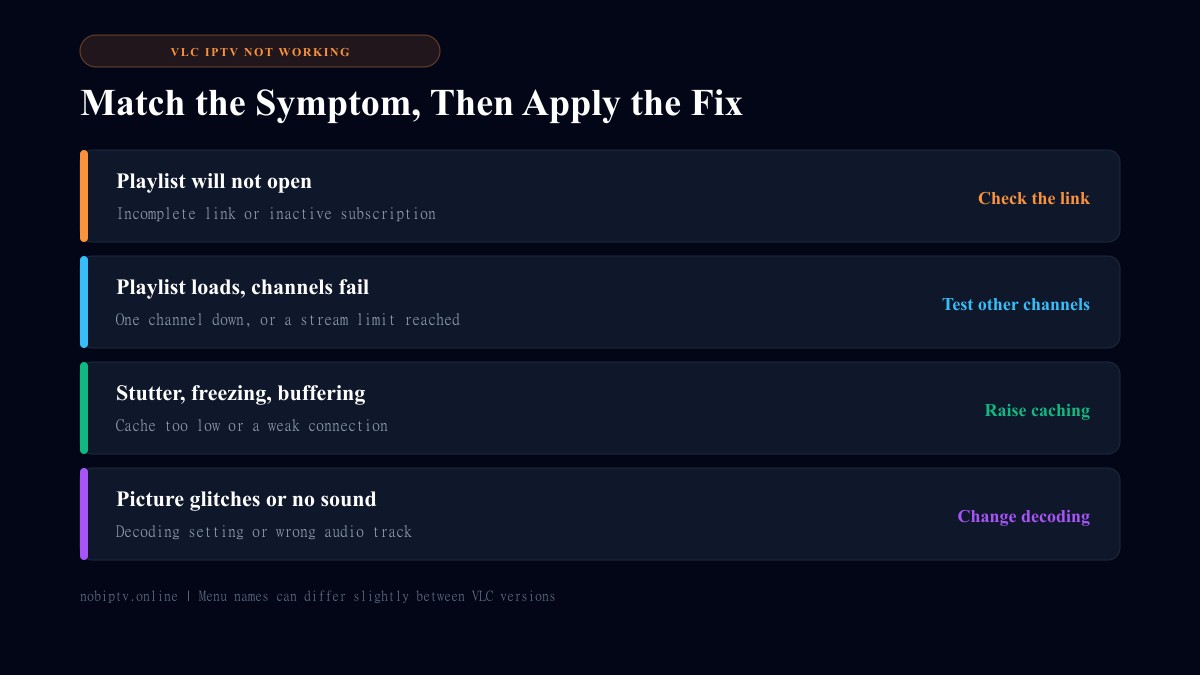
Start With These Two Checks
Before changing any settings, rule out the two most common causes. If you have not set up VLC yet, follow how to play IPTV in VLC first.
1. Is the link complete? Playlist links are long. Copying from an email or chat can cut off the end or add a stray space. Paste it again from the original source and check it end to end.
2. Is your subscription active? An expired plan is a common reason a link stops working. If your whole service looks unreachable, read IPTV is down.
Fix 3: Read VLC's Error Messages
VLC keeps a log of what went wrong. Open Tools > Messages, raise the verbosity level, and try to play the stream again. Lines mentioning that a connection failed or the stream could not be opened point to the link or network. Lines about decoding point to the video settings below. Menu names can differ a little between VLC versions.
Fix 4: The Playlist Loads But Channels Will Not Play
If you can see the channel list, your link works. Try several channels, not just one. A single dead channel is a channel problem. If every channel fails, check that you are not over the number of simultaneous streams your plan allows, for example because another device is watching, and wait a minute before trying again.
Fix 5: Raise Network Caching for Stutter and Freezing
- Go to Tools > Preferences.
- At the bottom left, set Show settings to All.
- Open Input / Codecs and find Network Caching (in milliseconds).
- Increase it in steps, save, and restart the stream.
A higher value adds a short delay when you start or change channels but gives VLC more room to smooth over a slow moment. If a big increase makes no difference, the connection is the likelier cause. See how to stop IPTV buffering and our internet speed guide for streaming.
Fix 6: Change Decoding Settings for Glitches
Blocky video, green flashes or a frozen picture can come from hardware decoding on some computers. In Tools > Preferences > Input / Codecs, change the Hardware-accelerated decoding option (try turning it off, or on if it was off), then restart VLC. For a striped or comb-like picture on some channels, try Video > Deinterlace. For no sound, choose another track under Audio > Audio Track.
Fix 7: Update VLC and Test Another Player
Install the current VLC from the official VideoLAN website. If the problem remains, open the same link in a second app or on another device. If it fails there too, VLC is not the cause. If it works elsewhere, VLC may simply be a poor fit for your playlist, since it is a general media player without the channel guide and favorites that IPTV apps provide. Compare options in our best IPTV player guide.
VLC IPTV Not Working: FAQ
Why does VLC say it is unable to open the MRL?
That message means VLC could not open the address you gave it. The usual causes are an incomplete or mistyped link, an expired subscription, or a provider that is temporarily unreachable. Recopy the full link and try again.
Why does my playlist load but no channel plays?
If the channel list appears but nothing plays, the link itself is working. Try several different channels. If every one fails, check that your subscription is active and that you are not over the number of simultaneous streams your plan allows.
Why is there picture but no sound in VLC?
Open the Audio menu, choose Audio Track, and select a different track. Some channels carry more than one. Also check that VLC and your computer are not muted.
Should I update VLC if IPTV stops working?
It is worth trying. Install the latest version from the official VideoLAN website, since older builds can have playback bugs that newer ones fix.
Is VLC the problem or is my IPTV service down?
Test the same link in a second player or on another device. If it fails everywhere, the issue is the link, your connection or the service rather than VLC.
Want Fewer Playback Headaches?
A reliable service and a player built for IPTV make daily viewing simpler. Compare our plans and supported devices.
Ready to Experience nobiptv?
Join thousands of satisfied viewers. Get the best IPTV services with our premium IPTV subscriptions and dedicated support.