Cheap IPTV (2026): Realistic Pricing, Red Flags & What Actually Works Under $15
With cable bills climbing past $100 and mainstream live TV streaming services pushing $75 to $80 per month, finding dependable cheap IPTV has become a priority for cord-cutters. This guide breaks down what realistic budget streaming costs, why $2 reseller panels crash during live sports, and how to configure your setup for buffer-free playback.
Short Answer: What Is Realistic Cheap IPTV?
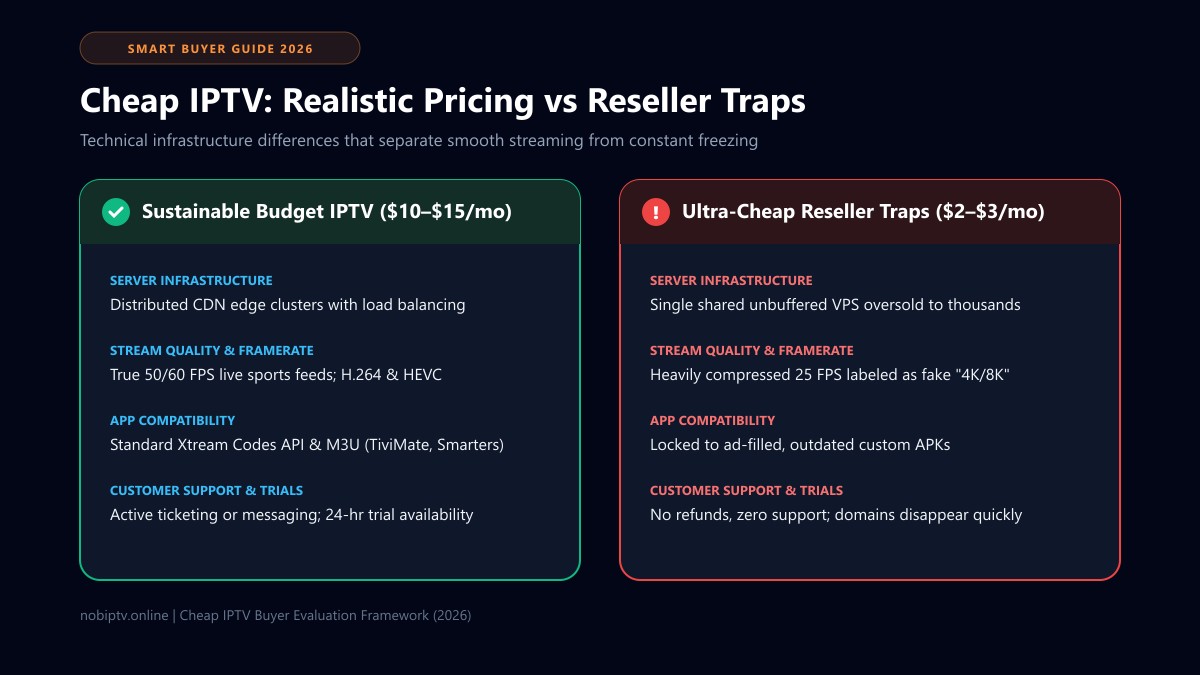
Realistic cheap IPTV sits in the $10 to $15 per month bracket for month-to-month plans, dropping down to the equivalent of $5 to $8 per month on 6-month or annual packages. At this price, dependable providers maintain distributed CDN edge servers, true 50/60 FPS live sports feeds, and active customer support.
What to avoid: Services charging under $4/mo usually overcrowd unbuffered single servers that freeze during Sunday football or PPV events. Look for standard Xtream Codes credentials, a 24-hour test option, and open player compatibility.
The 2026 Live TV Price Spectrum: Where IPTV Fits
To evaluate value realistically, cord-cutters need to understand where IPTV lands in the broader home entertainment ecosystem compared to traditional telecom packages and mainstream streaming apps:
| Streaming Tier | Typical Cost | Channel Range | Primary Trade-Off |
|---|---|---|---|
| Traditional Cable / Satellite | $85 – $140+ /mo | 100 – 250+ | High monthly bills, long contracts, equipment rental fees |
| Mainstream vMVPDs (YouTube TV, Hulu) | $75 – $85 /mo | 80 – 100+ | Steadily rising prices, regional sports network blackouts |
| Sustainable Budget IPTV | $10 – $15 /mo | 1,000s + VOD | Requires open player configuration on Fire TV or Android |
| Ultra-Cheap Reseller Panels | $2 – $4 /mo | Claim 20,000+ | Severe buffering during sports, 25 FPS caps, vanished domains |
| FAST Platforms (Pluto TV, Tubi) | Free ($0) | 200 – 400+ | Ad-heavy, no live regional sports or premium live cable channels |
If you want to compare sustainable subscription durations and device connections, review our transparent IPTV subscription plans.
The Technical Reality: Why Extreme Budget IPTV Freezes
Live broadcast video requires real-time data delivery. Unlike on-demand video (like Netflix) which pre-buffers minutes of footage onto your device memory, a live sports broadcast cannot be pre-downloaded. It arrives packet by packet.
A 1080p stream at 60 frames per second (FPS) draws between 6 Mbps and 12 Mbps of steady bandwidth. If a budget provider hosts 5,000 concurrent viewers during a Sunday afternoon NFL game or Champions League match, their server cluster must push between 30 and 60 Gbps of uninterrupted data. This is why established services utilize dedicated multi-CDN edge nodes rather than unmanaged single VPS boxes—as examined in our benchmark guide to the best IPTV service architecture for 2026.
Oversubscribed VPS Nodes
Bargain services selling for $2 to $3 cram thousands of accounts onto a single virtual private server. During live peak traffic, network interface cards bottleneck and cause widespread buffering.
25 FPS Framerate Caps
To save bandwidth, cheap resellers compress 60 FPS sports broadcasts down to 25 or 30 FPS. On a large TV screen, this appears as unnatural motion blur and judder.
No Load Balancers
Established providers balance incoming traffic across edge servers in different locations. Cheap panels run through a single IP address with no failover when servers stall.
5 Red Flags of an Unreliable Budget IPTV Service
Before entering your payment details on any budget streaming website, check for these warning indicators:
1Mandatory Proprietary APKs With Adware
Be cautious of sellers who demand that you sideload their custom app rather than providing standard login credentials. Many custom APKs are modified clones packed with pop-up ads or tracking code. A reliable provider always supports standard Xtream Codes API or M3U credentials so you can use trusted third-party players.
2Deceptive "8K Ultra HD" Marketing Claims
Real uncompressed 4K streaming demands 25 to 50 Mbps per user, and television networks do not broadcast in 8K. When a $3 service claims to have 10,000 "8K channels," they are using fake marketing tags on low-bitrate streams.
3Pushing 2-Year or 3-Year Upfront Commitments
Never buy a multi-year subscription on an unvetted service. Unstable budget storefronts often disappear within months. Start with a monthly or quarterly subscription, and only consider an annual plan after a provider has proven its reliability over time.
4No Free Trial or Live Test Availability
Any provider confident in its server capacity will provide a 24-hour trial or low-cost evaluation line. If a seller refuses to let you test during live hours, their servers likely buckle under load. Learn how to stress-test in our IPTV free trial testing guide.
5Unencrypted or Suspicious Checkout Forms
Never input direct debit or credit card details on unverified payment pages lacking SSL encryption and trusted merchant processing.
Maximizing Value: Hardware & Player Setup
Even the best budget subscription will perform poorly if your local hardware cannot decode the stream efficiently. Here is how to configure an affordable, high-performance setup:
1. Hardware Selection
Avoid generic no-name Android boxes. An Amazon Fire TV Stick 4K ($35–$50) or Chromecast with Google TV offers dedicated hardware video decoders for H.264 and HEVC. Step-by-step setup instructions are available in our Firestick setup guide and Smart TV setup tutorial.
2. Player App Selection
Use dedicated media players like TiviMate (Android TV/Firestick) or IPTV Smarters Pro (cross-platform). They offer electronic program guides, stream buffer adjustments, and fast channel navigation. If you encounter authentication issues, see our fix for failed to authorize IPTV Smarters. Read our full player comparison in the best IPTV player guide.
3. Xtream Codes vs M3U Protocols
Always choose Xtream Codes API (Server URL, Username, and Password) rather than long M3U playlist files. Xtream Codes organizes channels cleanly and prevents memory overflow on streaming sticks. Learn the details in our M3U vs Xtream Codes breakdown.
Network Optimization: Stopping Local Freezing
When playback freezes, the provider's server is not always the culprit. Internet Service Providers (ISPs) often throttle high-bandwidth video traffic during peak evening hours, and crowded Wi-Fi channels can introduce packet loss.
Check Bandwidth Requirements
Ensure your connection delivers at least 15 Mbps for HD and 30 Mbps for 60 FPS sports. Review our guide on internet speed for IPTV.
Use 5 GHz Wi-Fi or Ethernet
2.4 GHz Wi-Fi easily drops packets from microwave or neighbor interference. Switch your streaming stick to 5 GHz or use a USB Ethernet adapter for consistent wired latency.
Change Default DNS Settings
ISP-managed DNS servers often delay domain resolution for streaming nodes. Change your device DNS to Cloudflare (1.1.1.1) or Google (8.8.8.8).
Troubleshoot Buffer Settings
Increase buffer size in your player app from "None" to "Medium" or "Large" to smooth out micro-jitter. Follow our complete steps on how to stop IPTV buffering.
The 6-Step Stress-Test Checklist for Budget IPTV
- Test During Peak Primetime: Request a trial that covers 7:30 PM to 10:30 PM on a weekend. Any server works well on a Tuesday morning; only high-capacity CDNs survive weekend football or fight nights.
- Verify 50/60 FPS Fluidity: Check live sports broadcasts for smooth motion. If players or the on-screen ticker jitter, the stream is downscaled to 25 FPS.
- Test Channel Zapping Speed: Switch between 10 different channels. Playback should begin within 1 to 2.5 seconds. Longer delays indicate strained relay servers.
- Confirm EPG Guide Synchronization: Check that the program guide populates correctly across major networks so you can see upcoming schedules.
- Test VOD Seeking: Jump ahead 30 minutes in a movie. If the stream hangs indefinitely, the provider's storage server is under-provisioned.
- Send a Support Ticket: Ask a basic setup question during your trial. A quick response confirms active support; silence indicates you will be on your own if issues arise.
Frequently Asked Questions About Cheap IPTV
Can cheap IPTV really replace traditional cable?
Yes, for cord-cutters who pair a stable budget provider ($10 to $15 monthly) with a modern streaming device (like a Fire TV Stick 4K or Apple TV) and an open player app like TiviMate. It provides live networks, regional sports, and on-demand content at significant savings compared to traditional telecom packages.
Why do some $3 per month IPTV services stop working after a few weeks?
Ultra-low-cost sellers frequently rely on oversold reseller panels hosted on single unmanaged servers. When server costs exceed incoming revenue or when upstream hosts terminate service for resource abuse, the sellers simply close down the website and re-launch under a different brand name.
Is it safe to enter my credit card on cheap IPTV websites?
Exercise extreme caution. Many unvetted budget sites lack proper PCI-DSS compliant checkout integrations. Stick to services that utilize recognized merchant processors or secure intermediary payment gateways.
What internet download speed do I need for cheap IPTV?
You need a minimum stable download speed of 15 Mbps for standard HD (720p/1080p) streams and 25 to 30 Mbps for high-bitrate 60 FPS sports and 4K channels. Stable latency and low packet loss matter more than raw theoretical speed.
Do I need a VPN to use cheap IPTV?
A VPN is not strictly mandatory for IPTV playback to function, but it is strongly recommended if your internet service provider throttles streaming protocols during peak weekend live sports, or if you value personal network privacy.
Looking for Dependable Budget Streaming?
Explore nobiptv's transparent subscription tiers with compatibility across Firestick, Android, iOS, and Smart TVs.
Ready to Experience nobiptv?
Join thousands of satisfied viewers. Get the best IPTV services with our premium IPTV subscriptions and dedicated support.