IPTV on Plex: What Works, What Doesn't, and How to Set It Up
Plex is the app many people already use for their movie and TV library, so it is natural to ask whether it can play IPTV channels too. It can, but not the way you might expect. Here is how the setup works, what it takes to keep it running, and when a simpler player is the better choice.
Short Answer: Can You Watch IPTV on Plex?
Yes, with a workaround. Plex has no documented way to paste an IPTV M3U link directly. Its Live TV & DVR feature expects a TV tuner, so the usual method is to run a small free tool such as Threadfin or xTeVe that turns your M3U playlist and guide into something Plex sees as a tuner. It works, but it needs an always-on computer or server, a Plex plan that includes Live TV & DVR, and some upkeep.
Best for: people who already run a Plex server and want live channels in the same app. Not ideal for: anyone who just wants to watch live TV with the least effort.
Why Plex Can't Just Open an IPTV Playlist
An IPTV subscription usually gives you an M3U playlist link or an Xtream Codes login. Players such as VLC or TiviMate read those directly. Plex does not. Its live TV feature is designed for antenna and cable tuners, such as networked tuner boxes, and for the guide data that goes with them. Plex's own support pages for Live TV & DVR describe tuners, and we found no mention of IPTV playlists there.
Some online guides describe a built-in IPTV option in a Plex beta. We could not confirm this: Plex users reported not finding it, and nothing in Plex's documentation backs it up. If Plex adds native support in future, it will be documented on Plex's site, so check there first.
How the Proxy Method Works
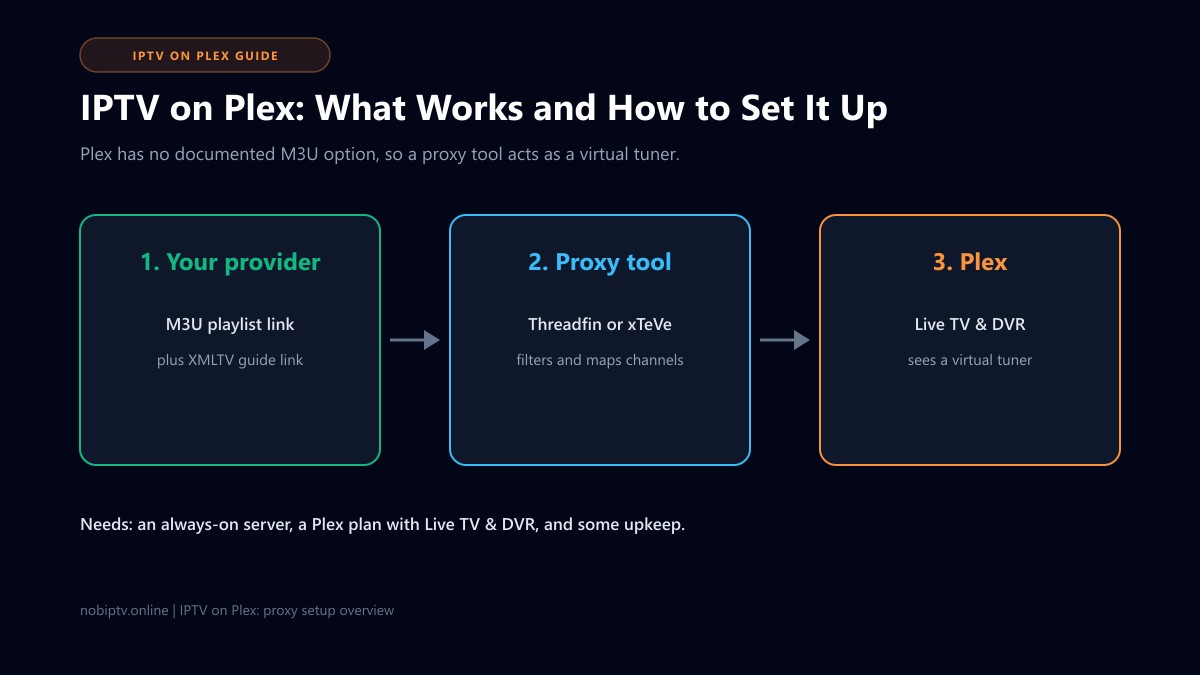
A proxy tool sits between your provider and Plex. It reads your M3U playlist and XMLTV guide, lets you pick and rename channels, and then presents the result to Plex as if it were a tuner on your network.
1. Your provider
Supplies an M3U playlist link and, if offered, an XMLTV guide link.
2. The proxy tool
Threadfin (based on xTeVe) merges, filters, and maps channels, then acts as a virtual tuner.
3. Plex
Finds the virtual tuner in Live TV & DVR and shows the channels and guide in its apps.
The proxy has to be running whenever you want to watch, so it usually lives on the same always-on machine as your Plex server, such as a home computer, a NAS, or a Docker host.
Setup Overview (Step by Step)
Treat these as a roadmap rather than exact menu clicks. Screens differ between Plex versions and proxy tools, and Threadfin's own page points users to the older xTeVe documentation for detailed steps.
- Check what you have. You need a Plex Media Server that is already working, a Plex plan that supports Live TV & DVR, and an M3U link from your provider. An XMLTV guide link is strongly recommended.
- Install the proxy. Put Threadfin (or xTeVe) on an always-on device in your home network. Follow the project's own install instructions for your system.
- Add your sources. In the proxy's web page, add the M3U link and the XMLTV link, then let it import.
- Trim the channel list. Keep only channels you actually watch. Smaller lists load faster, and community guides report that Plex struggles with very large channel counts (we could not confirm an exact limit in Plex's documentation).
- Add the tuner in Plex. In Plex, open the Live TV & DVR setup, add a device manually using the proxy's address and port, and match the guide data when asked.
- Test. Open a few channels on your TV app and check the guide lines up with what is playing.
Common Problems and Where to Look
Plex does not find the tuner
Check that the proxy is running, that Plex and the proxy are on the same network, and that you entered the right address and port. A firewall on the proxy machine is a frequent cause.
The guide is empty or wrong
This is almost always a channel-to-guide mapping problem. Our IPTV EPG not working guide covers the usual causes.
Buffering or stopping
Live IPTV through Plex adds another hop, and Plex may need to convert the stream for some devices, which uses the server's processor. Start with how to stop IPTV buffering and check your internet speed. Testing the same channel in a simple player, as in our IPTV to VLC guide, shows whether the problem is the stream or the Plex setup.
Everything stopped working
If channels fail everywhere, not just in Plex, the issue may be with the service itself. See IPTV is down.
Plex or a Dedicated IPTV Player?
| Question | IPTV through Plex | Dedicated IPTV player |
|---|---|---|
| Setup effort | Higher: extra proxy tool to install and maintain | Lower: paste a link or log in |
| One app for library and live TV | Yes | No, live TV only |
| Always-on machine needed | Yes, for Plex and the proxy | No |
| Direct M3U or Xtream login | No, via the proxy only | Usually yes |
| If something breaks | Three places to check: provider, proxy, Plex | Two places: provider and app |
If you mainly want live channels, a dedicated app is the easier path. Compare options in our best IPTV player guide, or see the setup pages for Fire TV, Smart TV, and Apple TV. Some other media servers, such as Emby and Jellyfin, document their own M3U live TV options, so they are worth a look if you want a media server with less middleware. We have not tested them for this guide.
Frequently Asked Questions About IPTV on Plex
Does Plex support IPTV natively?
Not in any way we could confirm. Plex's Live TV & DVR feature is built around TV tuners and guide data, and we found no official Plex documentation for pasting an IPTV M3U link. Community discussions say the same, which is why most people add a proxy tool in between. Plex changes its features over time, so check Plex's current Live TV & DVR support page before you start.
Do I need Plex Pass to use IPTV on Plex?
The proxy route relies on Plex's Live TV & DVR feature, and the Threadfin project lists Plex Pass among its requirements for Plex. Plex's plans and what they include change, so confirm the current requirements on Plex's own site rather than relying on a third-party guide.
What are xTeVe and Threadfin?
They are free, community-built tools that take an M3U playlist and an XMLTV guide and present them to Plex as if they were a TV tuner. Threadfin describes itself as based on xTeVe. They run on a computer, NAS, or Docker host on your home network, not inside Plex.
Do I need an XMLTV guide file as well as the M3U link?
You can watch channels without one, but the on-screen guide in Plex will be empty or incomplete. If your provider offers an XMLTV (EPG) link, add it to the proxy as well. If the guide looks wrong afterwards, see our IPTV EPG fix guide.
Is Plex the best way to watch IPTV?
Usually not. Plex is excellent for your own movies, shows, and music, but IPTV on Plex needs extra software and ongoing upkeep. A dedicated IPTV player is simpler for live TV, and you can keep Plex for your personal library. Plex only makes sense for IPTV if you want everything in one app and are comfortable running a small server tool.
Will an nobiptv subscription work with this setup?
This method needs a standard M3U playlist link, and ideally an XMLTV guide link, from your provider. Formats differ between plans, so if you are an nobiptv customer, contact us to confirm which playlist formats your plan includes before you set anything up.
Choose the Setup That Fits Your Home
Check which devices nobiptv supports and what each plan includes before you decide between Plex and a dedicated player.
Ready to Experience nobiptv?
Join thousands of satisfied viewers. Get the best IPTV services with our premium IPTV subscriptions and dedicated support.