Free Trial IPTV: How to Test Before You Pay
Testing an IPTV service before you pay is the safest way to find out whether it works on your own device and connection. This guide covers how a free trial IPTV login works, how to ask for one without handing over card details, and how to stress-test streams during live games.
Short Answer: How to Get and Use an IPTV Free Trial
An IPTV free trial, also called a free trial IPTV, is a short test login that lets you check a provider's live channels and video on demand (VOD) catalog before you pay. Trial length and what it includes vary by provider. Legitimate services do not ask for credit card numbers or recurring payment authorizations.
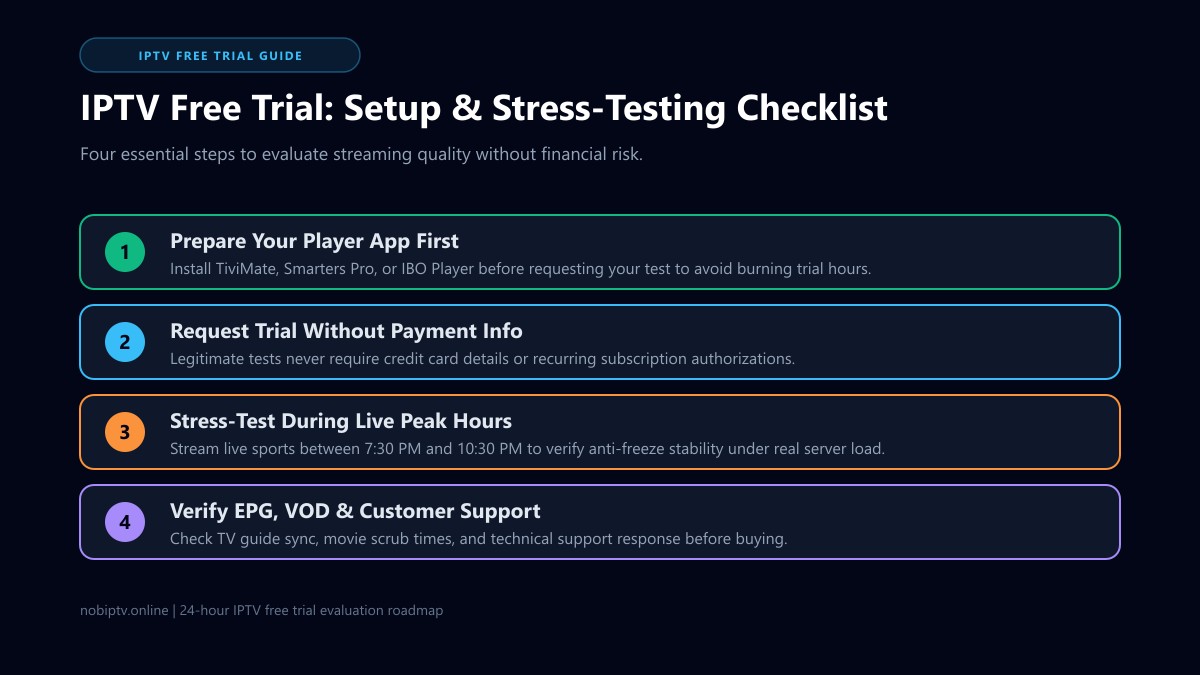
To maximize your trial, install a verified player such as TiviMate, IPTV Smarters Pro, or IBO Player first, request Xtream Codes API credentials, and schedule your test to run during high-traffic evening sports hours (7:30 PM to 10:30 PM) to verify server stability under peak load.
How to Ask for a Free Trial IPTV From nobiptv
To find out whether a trial is available, message nobiptv support on WhatsApp using the chat button on this site, or use the Contact page. Support will tell you whether a trial is offered, how long it lasts and what it includes. None of that is guaranteed in advance.
Tell support which device and app you plan to use, such as a Firestick with TiviMate or a Samsung TV with IPTV Smarters. If you would rather compare plans first, see the pricing page and the supported devices.
What Is an IPTV Free Trial and How Does It Work?
An IPTV free trial is a temporary account provisioned on a streaming provider's server middleware. Rather than locking you into an upfront contract, a trial gives you temporary login details so you can test channel reliability, picture clarity, and app compatibility in your own home environment.
Ideally a trial runs on the same servers as paid accounts, which is what makes it a useful test of how the provider handles bandwidth at peak viewing times. You cannot see this from the outside, so ask the provider and judge it by what you observe, especially in the evening.
The 24-Hour Evaluation Window
Trial length varies, and not every provider offers one. If you can get roughly 24 hours, use it to cover both a quiet daytime period and the busy evening window when live sports put the most load on servers.
Xtream Codes vs. M3U Links
When receiving your trial credentials, look for Xtream Codes API details (Server URL, Username, and Password). Compared to pasting a lengthy M3U web address, Xtream Codes handles channel categories dynamically and syncs guide data much faster on TV devices.
How to Set Up an IPTV Free Trial (Step-by-Step)
Because your trial countdown timer typically starts the moment your credentials are generated, preparing your player application ahead of time ensures you do not waste valuable testing hours troubleshooting app installations. Follow this four-step setup routine:
Install Your Preferred IPTV Player First
Before requesting a trial, download a well-tested media player from your device's official app store or via verified sideloading tools. On Firestick and Android TV devices, TiviMate IPTV Player provides the cleanest interface. On Smart TVs and mobile platforms, IPTV Smarters Pro or IBO Player deliver dependable compatibility.
Helpful setup walkthroughs: Fire TV Setup, Smart TV Setup, or Android TV Setup.
Request Test Credentials (No Credit Card)
Submit a trial request through the provider's official website or direct customer support channel. A trial request should not need payment card details. Check your email or messaging inbox for your Server Portal URL, Username, and Password. For nobiptv, ask support first (see the section above).
Input Credentials via Xtream Codes API
Open your IPTV player and select "Add Playlist" or "Xtream Codes API." Enter any descriptive name (such as "nobiptv Trial"), followed by the exact Server URL, Username, and Password provided. Ensure you include the correct port number (e.g., http://server.example:8080) without extra spaces.
Sync the Electronic Program Guide (EPG)
Allow your player 60 to 90 seconds to download channel groups and guide timelines. Once populated, check that schedules align with your local time zone. If you notice missing program data, consult our guide on fixing IPTV EPG issues.
The 24-Hour Trial Checklist: What to Test Hour-by-Hour
Do not simply leave a single news stream running for ten minutes and assume the service is reliable. To determine whether an IPTV provider can permanently replace your cable or satellite subscription, conduct tests across these four key phases:
ADaytime Baseline: Channel Switching & Audio Pacing
During off-peak daytime hours, flip through 10 to 15 channels across different categories (local US networks, UK feeds, Canadian broadcasts). As a rough rule of thumb, a channel should start within a few seconds. Check that lip-sync audio matches video movement precisely and that closed captions or secondary audio tracks engage cleanly.
BPrime-Time Stress Test (7:30 PM – 10:30 PM): Live Sports
This is the single most critical test of any IPTV service. Tune into a marquee live broadcast—such as an NFL match, Premier League fixture, NBA game, or PPV event. Observe motion clarity on 50FPS or 60FPS sports feeds. If the stream stutters, loops, or drops resolution during halftime and peak moments, read our recommendations to stop IPTV buffering or examine our technical IPTV free trial benchmarking protocols.
CVOD Library Scrubbing & 4K Bitrates
Open the Video on Demand (VOD) movie or series section. Select a 4K UHD title and drag the scrub bar forward 30 minutes, then backward 10 minutes. Playback should resume within a few seconds. Long pauses or audio desync can point to slow servers, but rule out your own network first.
DCustomer Support Responsiveness
Send a routine question regarding device setup or stream formats to the provider's support desk. How quickly and clearly support answers gives you a hint of the help you can expect as a subscriber.
4 Red Flags of Low-Quality or Deceptive IPTV Trials
Not every free trial offered online is created equal. Be vigilant and avoid services that exhibit any of these warning signs:
Requiring Credit Card Information
If an "IPTV free trial" insists on billing card numbers, CVVs, or PayPal pre-approvals, it is structured to charge you automatically when the test expires. Never hand payment information to an unverified trial site.
Gated or Restricted Sports Channels
Some sellers restrict trial users to standard news channels, locking live sports and 4K feeds behind paid tiers. This prevents you from testing whether their server infrastructure can handle peak-time sporting crowds.
Forced Custom APK Installations
Trustworthy providers offer standard Xtream Codes or M3U credentials that function seamlessly inside store-approved players like TiviMate or Smarters. Avoid services that force you to install proprietary, unverified APK packages with broad system permissions.
Isolated Demo Servers
A trial hosted on a separate, lightly loaded "demo" server can look faster than a paid account will. You cannot confirm this from the outside, so compare trial performance with your first days as a subscriber and ask about refunds. Review our IPTV with free trial buyer's guide for additional vetting criteria.
IPTV Free Trial vs. "Free IPTV": Key Differences
It is vital to distinguish between testing a premium IPTV service via a temporary free trial and attempting to stream through free, publicly circulating playlists or scrapers.
| Feature | Premium IPTV Free Trial | Public Free M3U Links |
|---|---|---|
| Account Type | Dedicated, authenticated login | Unauthenticated public web link |
| Stream Stability | Depends on the provider; you can test it first | Often unpredictable; dead links are common |
| Live Sports Reliability | Test a live game at peak time yourself | Often offline or buffering during popular games |
| TV Guide (EPG) | Usually an integrated program guide | Often missing; may need manual XMLTV setup |
| Technical Support | Support via chat or email, if the provider offers it | Usually none |
While publicly scraped lists can be fun for hobbyists to explore (as discussed in our free live stream IPTV overview), cord-cutters seeking dependable daily television for sports and family viewing invariably benefit from testing a dedicated subscription service.
What a Short Trial Can't Tell You (and What to Do When It Ends)
A trial shows how a service behaves for a day or so on your own device and network. It cannot show how the provider handles a bad weekend, a major event or an outage over several months.
- Test on the same device, app and connection you will use every day. Check your internet speed for streaming first so a slow connection is not blamed on the provider.
- If a channel fails, work out whether the problem is local or on the provider's side with our guide to what to do when IPTV is down.
- Decide before access ends. Ask whether anything renews automatically, and compare the plans on the pricing page before you pay.
Free Trial IPTV: Frequently Asked Questions
How long does a standard IPTV free trial last?
It varies by provider, and some providers do not offer a trial at all. A window of around 24 hours is common, and it is enough to test both a quiet daytime period and busy evening prime time (7:30 PM to 10:30 PM), especially during live sports. Ask the provider for the exact length and what the trial includes before you start the clock.
Do I need to enter credit card details to get an IPTV trial?
No. A legitimate, safe IPTV test should never require credit card details, debit card information, or recurring payment pre-authorizations. If a website asks for payment credentials for a 'free trial,' it often enrolls you in an automatic monthly billing cycle. Only test services that provide credentials with an email address or direct messaging contact.
What is the difference between Xtream Codes and M3U for a trial?
Xtream Codes API uses a server URL, username, and password, whereas an M3U is a raw text web link containing channel URLs. For testing on media players like TiviMate or IPTV Smarters Pro, Xtream Codes is faster, organizes live TV categories automatically, and populates the Electronic Program Guide (EPG) reliably without crashing low-memory streaming sticks.
Can I watch 4K live sports during a free trial?
It depends on the provider. Some give trial accounts the same lineup as paid accounts, and others restrict them. Ask what the trial includes before you start. If sports or high-bitrate feeds are blocked during a trial, you cannot judge how the service will perform during a live game.
Why does my IPTV trial buffer during live games?
Buffering during live sporting events typically stems from either server congestion on the provider's end, local Wi-Fi interference, or ISP throttling. Testing over a direct Ethernet cable or 5 GHz Wi-Fi band isolates local network issues. If buffering persists exclusively during peak sporting events, the provider's servers likely lack adequate CDN bandwidth headroom.
Which app is easiest to use for an IPTV trial?
On Amazon Firestick and Android TV devices, TiviMate offers the fastest channel zapping and cleanest EPG navigation. For cross-platform testing across Android, iOS, Windows, and Smart TVs, IPTV Smarters Pro and IBO Player provide straightforward Xtream Codes login screens that connect in seconds.
Is there a free trial IPTV with no credit card?
A trial request should not need card details. A site that demands a card number for a 'free' trial may be setting up automatic billing, so treat that as a red flag. To find out whether nobiptv currently offers a trial, contact support on WhatsApp or through the Contact page. Availability, length and what a trial includes are confirmed by support and are not guaranteed.
How do I test a free trial IPTV on a Firestick?
Install your player first, such as TiviMate or IPTV Smarters Pro, then ask the provider for Xtream Codes login details and enter them in the app. Follow the Fire TV setup guide on this site, let the guide data load, and test a live game in the evening before you decide.
What happens when a free trial IPTV ends?
Typically the test login stops working, and nothing continues unless you subscribe. Before you start, ask the provider whether anything renews automatically. Decide while you still have access, and compare what you saw against the plans on the pricing page.
Test Stream Stability on Your Devices Today
Verify buffer-free live sports, crystal-clear 4K resolution, and fast channel zapping on your Firestick, Smart TV, or mobile player before committing.
Ready to Experience nobiptv?
Join thousands of satisfied viewers. Get the best IPTV services with our premium IPTV subscriptions and dedicated support.