Public IPTV Playlist: What It Is, Where It Falls Short, and How to Use One
If you have searched for a public IPTV playlist, you are probably looking for a free M3U link you can open in a player right now. These lists do exist, and some are run by open-source communities. This guide explains how they work, what to check before you use one, and when a private playlist from a provider makes more sense.
Short Answer: What Is a Public IPTV Playlist?
A public IPTV playlist is an M3U file that anyone can open without an account. It lists links to streams that other people publish. It costs nothing, but it comes with no support and no guarantee: channels can disappear without notice, quality varies, and you have to judge for yourself whether a stream is safe and appropriate to watch where you live.
A good fit for: trying IPTV out, testing a player, or casually browsing openly published channels. Not a fit for: anyone who needs reliable live sports, a program guide, or help when something breaks.
How a Public Playlist Works
An M3U playlist is a plain text file: a list of channel names and the web addresses of their streams. Your player reads the list and plays whichever stream you pick. If you are new to the format, our M3U vs Xtream Codes guide explains how it differs from a login-based service.
What makes a playlist "public" is that nobody controls who opens it. There is no account, no personal link, and no one on the other end who answers questions. The playlist maintainer usually does not run the streams either, they just collect the addresses.
Example: The iptv-org Project
The best-known source is the open-source iptv-org project on GitHub, which describes itself as a collection of publicly available IPTV channels from around the world. Its README lists a main playlist plus other playlists sorted into groups, and says you can copy a playlist link into any video player that supports live streaming.
Its Legal section is worth reading in full. In summary, the project says the repository stores no video files, contains only user-submitted links to publicly available streams, and has no control over where those links lead. Removing a link from a list does not remove the content from the web. That is a sensible and honest description, but it also means the project cannot promise that every channel is licensed for your country, and neither can we.
How to Open a Public Playlist
- Get the playlist link from the source itself. Use the project's own page rather than a copy posted on a forum, social post, or file-sharing site.
- Open it in a player. In VLC, choose Media > Open Network Stream, paste the link, and press Play. Our IPTV to VLC guide has the full steps, including phones.
- Search the list. Large playlists have thousands of entries, so use the player's playlist search to find channels.
- Expect some dead entries. If a channel does not load, try another before assuming the problem is your setup. If nothing plays, see VLC IPTV not working.
For TV devices, a dedicated app is easier to use than VLC. Compare options in our best IPTV player guide.
What to Check Before You Use a Public Playlist
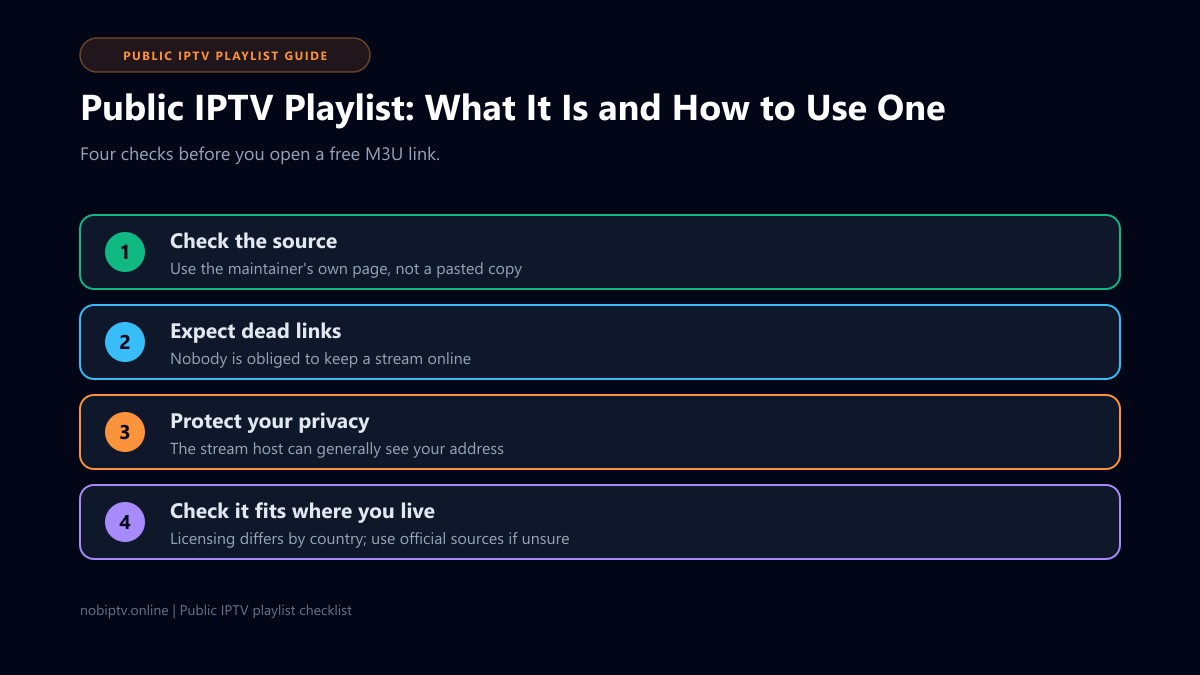
1. Where did the link come from?
Prefer the maintainer's own page. A link pasted in a comment or message can be changed by anyone and may lead to something very different from what it claims.
2. Does it need anything besides a player?
A playlist should only need a player that opens M3U links. Be cautious about any site that asks you to install an unknown app, extension, or "codec" to watch.
3. Who can see you watching?
When you play a stream, the server hosting it can generally see your internet address. That is true of any streaming, but with a public list you do not know who runs the server. Do not enter personal details into any player or site that asks for them.
4. Is it appropriate where you live?
Licensing and rules differ by country, and a channel being publicly reachable does not by itself settle whether you may watch it. If you are unsure about a channel, use an official source instead. Our free live stream IPTV guide covers legal free options.
Public Playlist vs Private Provider Playlist
| Question | Public playlist | Provider playlist |
|---|---|---|
| Cost | Free | Paid subscription |
| Account and support | None | Your own link and a support contact |
| Reliability | Links can fail without notice | Provider is responsible for keeping streams running |
| Program guide | Separate setup, if available | Often supplied; see our EPG guide |
| Best for | Trying IPTV, testing a player | Daily viewing, live sports |
If you want to test a paid service before committing, our IPTV free trial guide explains what to look for. If streams that do load stutter, see how to stop IPTV buffering. And if you already run a Plex server, our IPTV on Plex guide covers that route.
Frequently Asked Questions About Public IPTV Playlists
What is a public IPTV playlist?
It is an M3U file, or a link to one, that anyone can open without an account. It lists stream addresses for channels that are published openly on the internet. Nobody is responsible for keeping those streams online, so lists can go stale quickly.
Is it legal to use a public IPTV playlist?
It depends on what the playlist links to and where you live, and we cannot give legal advice. The iptv-org project says its repository stores no video and only links to publicly available streams, and that it has no control over what those links point to. Whether a particular channel is licensed for your country is something you need to check yourself.
Why do channels in a public playlist stop working?
A public playlist only points to streams that other people run. If the host moves, changes the address, limits access, or shuts the stream down, the link fails and nobody is obliged to fix it. This is a common reason lists need constant cleaning.
Can I get a program guide with a public playlist?
Not from the playlist itself. A guide needs separate XMLTV data. The iptv-org project points to a separate EPG repository for guide data for most of its channels, but you would need to set it up in a player that accepts an XMLTV link.
Is a public playlist the same as a paid IPTV service?
No. A public list is a free collection of links with no account, no support, and no promise that anything works. A paid service gives you your own login or playlist, support, and a provider that is responsible for keeping streams running. Neither is automatically better, they solve different problems.
Which player should I use to open one?
Any player that accepts an M3U link will do. VLC is a simple free choice on a computer. Our IPTV to VLC guide shows the steps, and the best IPTV player guide compares dedicated apps for TV devices.
Need Something More Dependable?
See which devices nobiptv supports and what each plan includes if you would rather have your own playlist and a support contact.
Ready to Experience nobiptv?
Join thousands of satisfied viewers. Get the best IPTV services with our premium IPTV subscriptions and dedicated support.