IPTV Playlist: What Is Inside the File and How to Use It
An IPTV playlist is the file that tells your player where every channel lives. Most of the time you only paste a link and it works, but when it does not, knowing what the file contains makes the problem much easier to find. This guide covers what is inside a playlist, how to load one, and how to fix the usual failures.
Short answer
An IPTV playlist is a plain text file, usually in M3U format, that lists channel names and the address of each stream. Your player reads it and builds a channel list. The playlist does not contain video and is not a subscription: it only works if the streams it points to are live and you are allowed to use them.
To use one: paste the link (or open the file) in an app that accepts M3U, then wait for the channels to load. If it fails: open the link in a browser first to see whether it returns a playlist or an error.
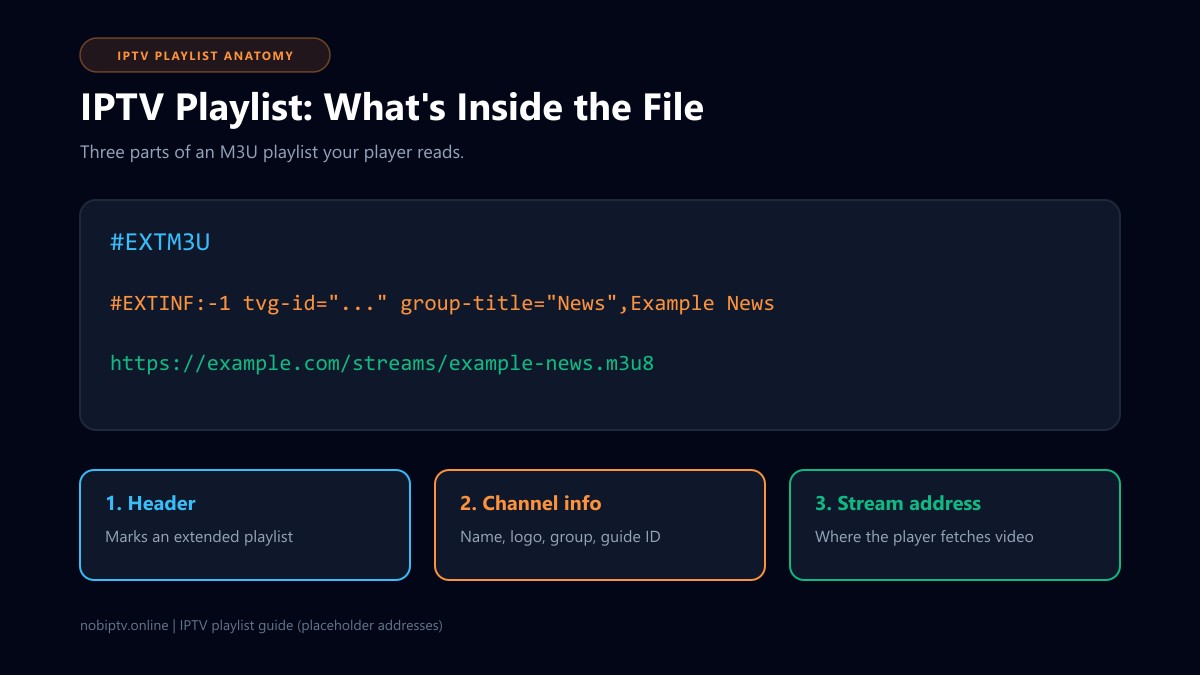
What Is Inside an IPTV Playlist
An IPTV playlist is normally an M3U file. As the M3U article on Wikipedia notes, it is a plain text format with no formal specification, so it works as a common convention rather than a strict standard. The extended version starts with a #EXTM3U line, and each entry has an #EXTINF line describing the item, followed by the address it plays.
#EXTM3U
#EXTINF:-1 tvg-id="example.us" tvg-logo="https://example.com/logo.png" group-title="News",Example News
https://example.com/streams/example-news.m3u8
#EXTINF:-1 tvg-id="sample.ca" group-title="Sports",Sample Sports
https://example.com/streams/sample-sports.m3u8
The addresses above are made-up placeholders to show the layout, not working streams.
#EXTM3U marks the file as an extended playlist and should be the first line.
#EXTINF carries the entry details. The text after the last comma is the channel name your player shows.
tvg-id, tvg-logo, group-title are optional attributes that many IPTV players read. Kodi's IPTV Simple Client documents them: tvg-id maps a channel to program guide data, tvg-logo sets the logo, and group-title sorts channels into groups. Other apps may support a different set.
The address line is where the player fetches the stream. If that address is dead, the channel fails even though it appears in the list.
Files ending in .m3u8 are UTF-8 text, while .m3u traditionally follows the computer's default encoding. Most IPTV apps accept both.
Playlist vs Subscription vs Xtream Login
People often use these terms for the same thing, but they are different parts of the setup.
Playlist
The list of channels and stream addresses. A file or a link.
Subscription
The service that runs the streams and decides who can watch them.
Xtream login
A server, username and password the app uses instead of a playlist link.
If your provider gave you a username and password rather than a link, read M3U vs Xtream Codes to see which one suits your app.
How to Load an IPTV Playlist
- Get the playlist from its source. For a paid service, that is your provider. For a free public list, use the maintainer's own page (see our public IPTV playlist guide).
- Choose link or file. Kodi's IPTV Simple Client, for example, offers both a local path and a remote path. A link stays current; a file is a snapshot.
- Paste or open it in your player. Look for options named M3U URL, playlist URL, or add playlist. Menu names differ between apps and versions.
- Add the guide separately if needed. The playlist does not contain a TV guide. Many apps take a separate XMLTV link. If the guide is blank, see IPTV EPG not working.
- Wait for the first load. A large playlist can take a while to parse, especially on a low-power streaming stick.
For a free computer player, follow IPTV to VLC. For TV devices, compare apps in the best IPTV player guide, or use the setup guides for your device.
IPTV Playlist Not Loading or Empty: What to Check
1. Open the link in a web browser
A working playlist link normally downloads or displays text starting with #EXTM3U. If you see an error page, a login page, or nothing, the problem is the link, not your player.
2. Check for copy errors
Playlist links are long. A missing character, an added space, or a line break from a messaging app will break them. Paste into a plain text editor first to inspect it.
3. Confirm the account is still active
If the link worked before, an expired subscription or a changed link from the provider is a common reason it stops. Ask your provider for a fresh link. If sign-in errors appear in IPTV Smarters, see failed to authorize.
4. Channels list but will not play
The playlist loaded fine, so the stream addresses are the issue. Try several channels. If all fail, check whether the service is having an outage using IPTV is down. If they play but stutter, see how to stop buffering.
5. Try a second player
If one app fails, test the same link in another. This tells you whether the playlist or the app is the weak point. For VLC-specific issues, see VLC IPTV not working.
Keep Your Playlist Private and Legitimate
A provider playlist link can act like a login, so keep it out of screenshots, public chats, and shared documents. Only use playlists from a source you trust, and be wary of any site that asks you to install an unknown app to open one.
Having a playlist file does not by itself give you the right to watch what it lists. Licensing differs by country, so check that your source is authorized to offer the channels where you live. Free lists are a separate case, covered in public IPTV playlist and free live stream IPTV. If you want to see how a paid playlist behaves before committing, our IPTV free trial guide shows how to test one properly. Sports viewers can also read M3U playlists for IPTV sports.
IPTV Playlist: Frequently Asked Questions
What is an IPTV playlist?
It is a text file, usually in M3U format, that lists channel names and the web address of each channel's stream. Your player reads the list and plays the stream you pick. The playlist holds no video itself.
Is an IPTV playlist the same as an IPTV subscription?
No. The playlist is only the list. The subscription is the service that runs the streams the list points to. A playlist without working streams behind it shows channels that will not play.
What is the difference between .m3u and .m3u8?
Both are M3U playlists. The .m3u8 extension marks a file saved as UTF-8 text, while .m3u traditionally uses the computer's default encoding. Most IPTV apps accept either, and the practical difference is mainly how special characters in channel names are handled.
Should I load a playlist by link or by file?
A link is usually better for daily use because the app can fetch a fresh copy when the provider changes channels. A downloaded file is a snapshot and goes out of date. A file is handy for offline editing or a quick test.
Why does my playlist load but show no channels?
Common causes are an expired or wrong link, a link that returns a web page or an error instead of a playlist, a typo from copying, or an app that blocks the address. Open the link in a web browser to see what it returns, then follow the checks below.
Is it safe to share my IPTV playlist link?
Treat it like a password. Playlist links from a provider often contain account details, so anyone who has the link may be able to use your subscription. Do not post it in public groups, screenshots, or support threads.
Want a Playlist With Support Behind It?
Check which devices nobiptv supports, then compare plans.
Ready to Experience nobiptv?
Join thousands of satisfied viewers. Get the best IPTV services with our premium IPTV subscriptions and dedicated support.